
SideCall — call guard
Keeps your ear off the buttons, and keeps your mic alive.
What it’s for
Every phone has a small sensor near the earpiece that does two jobs during a call: it blanks the screen when the phone is at your face, and it keeps the call running while the screen is dark. The SP-01 ships without a working one. Two things go wrong as a result, and SideCall fixes both.
Your cheek presses the buttons. With nothing to blank the screen, the dialer stays lit and fully live against the side of your face. Mid-call your ear lands on whatever is under it: mute, the keypad, hang up. You finish a call and realise you muted yourself four minutes ago, or dialled a stranger into a three-way, or hung up on your grandmother.
Your microphone dies when the screen sleeps. On a longer call the screen eventually sleeps, or you lock it yourself, and on the SP-01 that can take the microphone with it. The call looks connected. The other side has stopped hearing you.
Both come from the same missing piece, so SideCall handles them together. It is not a dialer: it does not place calls, answer them, or hang them up, and it never touches your call. It is a thin guard that floats over whatever dialer you use and gets out of the way the moment you want it gone.
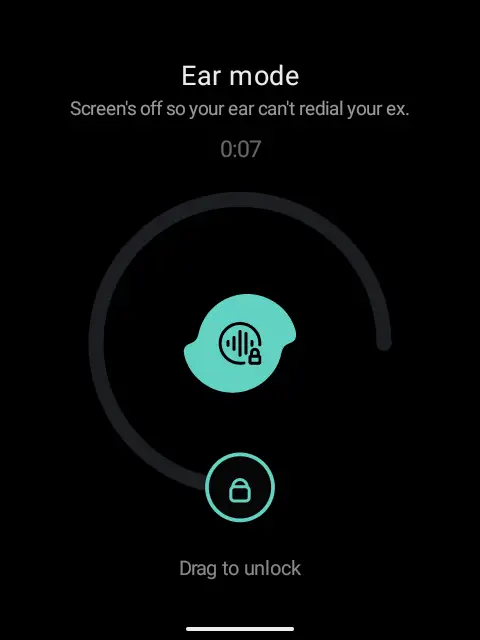
On the phone it is called ear mode, which is the phrase the black screen shows you, and the one the settings use.
What it does
- Reads how you are holding the phone from the audio route, which Android already knows.
- At your ear, it enters ear mode: a calm black screen over the dialer, so nothing your cheek touches reaches a button. It still shows the call is live and how long it has been going.
- To leave, drag the ring three-quarters of the way around. A cheek resting on the screen cannot do that by accident.
- On speaker, Bluetooth or a wired headset there is nothing to guard against, so it leaves the screen visible and only holds it awake, which fixes the mic bug without hiding anything.
- Works from the lock screen: answer a call locked and the guard is already there.
- Returns to ear mode if you set the phone down, but warns you first with a tappable “Ear mode in 3…” chip, so it never darkens the screen out from under you.
- After you unlock, a small floating badge lets you tap to return to ear mode.
- Turn the whole thing off from its own setup screen, without uninstalling it.
Screenshots
Setup
SideCall asks for two one-time permissions, both handled from its setup screen so a prompt never lands in the middle of a call.
- Draw over other apps, which is the guard itself. Android has no in-app dialog for this one, so the button sends you to the right Settings toggle.
- Call detection, so SideCall knows the instant a call begins. Without it the guard never arms.
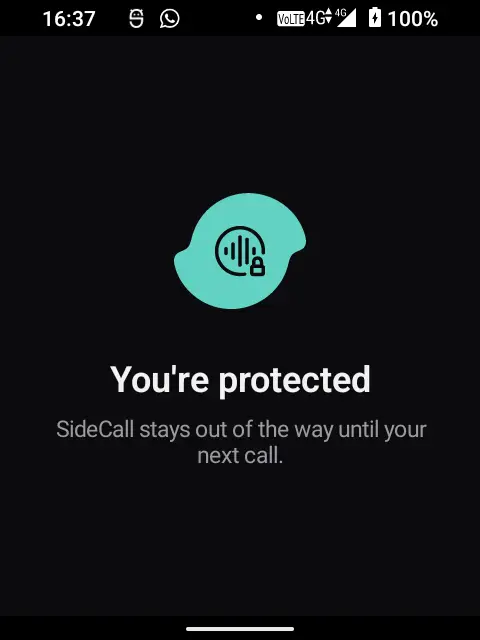
Grant both and the screen reads “You’re protected.” From the same screen you can set how long the screen stays open before ear mode returns (5, 8, 15 or 30 seconds), or turn SideCall off entirely.
Privacy
SideCall is a guard, not a listener.
- It never records or reads your call. It has no access to call audio and asks for none.
- It never touches the network. The app declares no internet permission at all, so there is nowhere for anything to go.
- It never stores anything about your calls: no numbers, timestamps or logs. The guard’s state lives in memory for the length of the call, and the only things written to disk are your three settings.
- Call detection tells it only that the call state changed, ringing to in-call to idle. It is not used to read numbers, contacts, or call logs.
- The “guarding this call” notification exists only while you are on a call, because the service behind it stops itself when the call ends.
Honestly
One limitation, and it is a platform boundary rather than a bug I can patch. While Android’s notification shade is pulled down over the guard, SideCall gets no signal from the system, so it cannot tell you are busy in there. Sit in the shade past the idle timer and ear mode returns behind it, so you will drag the ring to unlock afterwards. Nothing breaks; it is occasionally annoying.
One more, from the lock screen: reveal the dialer while the phone is locked and there is no floating badge to bring ear mode back by hand, because Android will not let an app draw one over the lock screen. The badge returns the moment you unlock.
For developers
SideCall is one system overlay over the stock dialer. A call begins in the background, and Android blocks apps from launching screens from the background, so a floating window is the only reliable way to appear over a call you do not own.
Everything the guard decides lives in one small pure state machine (Guarded, Open, Awake, Countdown, Off) driven by call-state changes, the audio route, and touches. Everything Android-shaped sits outside it as thin adapters: the window, the telephony listener, the audio reader, and a watchdog that tears the guard down if it hangs. So the part that must never get a call wrong is testable without a device, an overlay or a call. If anything does wedge, it fails safe: the watchdog kills the process and the black window dies with it, handing you back to the dialer.
Install SideCall

The SideSuite app pack. Scan this in your phone’s Library app and all the SideSuite apps appear in your library. You choose which ones to install, and updates then arrive on their own without you tapping through anything.
Just SideCall, on its own
If you only want this one, download the signed APK from its releases and open it on the phone. You will not get update notifications this way; Obtainium is the middle option if you want those without the pack.